Building the Financial History of a Vehicle
The Upload Receipt workflow transforms an ordinary receipt or invoice into a permanent, structured record — treating every expense as evidence in a vehicle's story, not simply a transaction to be filed away.
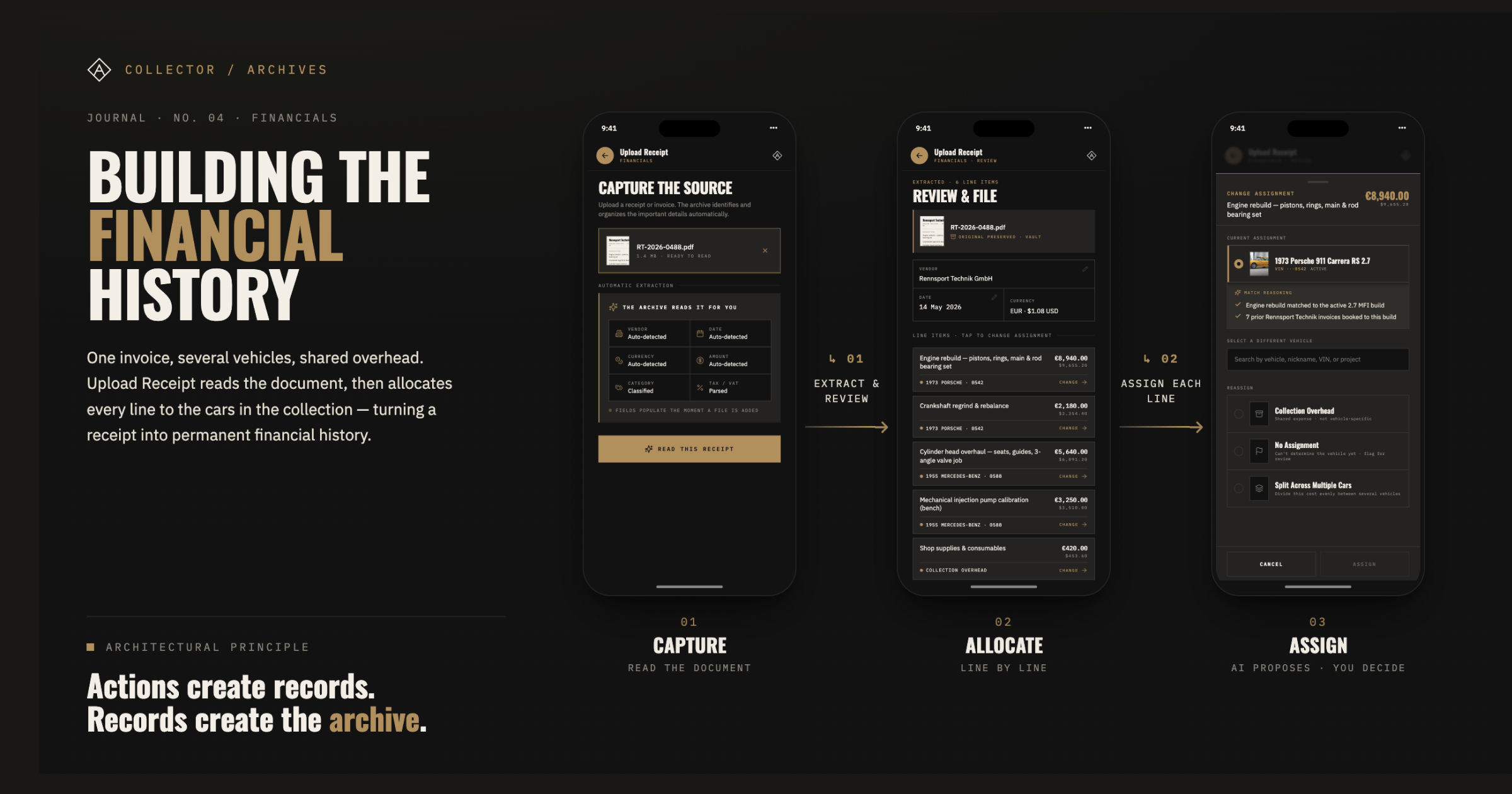
The Upload Receipt workflow transforms an ordinary receipt or invoice into a permanent, structured record — treating every expense as evidence in a vehicle’s story, not simply a transaction to be filed away.
This entry is about one of the smallest pieces of information generated during ownership: the receipt.
Most software treats receipts as accounting artifacts — proof that money changed hands, useful for taxes, and largely forgotten afterward. Collector Archives approaches them differently.
Every receipt captures a moment in the life of a vehicle. It records who performed the work, when it happened, what was done, what it cost, and provides evidence that supports both the vehicle’s history and its financial record. Read carefully, a receipt is more than documentation. It is a primary source.
This release focuses on transforming receipts from disposable paperwork into permanent records that contribute to the long-term financial history of a vehicle.
A receipt is more than documentation. It is a primary source.
Why Build This Now?
Solving a real operational problem
At first glance, receipt management might seem like an unusual place to begin building Collector Archives. It isn’t the most visually impressive feature, nor is it the one most people would expect from a collector vehicle platform. I’m prioritizing it because it solves a real operational problem.
Today, collection managers spend an enormous amount of time organizing receipts, preparing reimbursement reports, and maintaining financial records. Much of that work is repetitive, manual, and disconnected from the vehicle’s historical record.
Receipts arrive from many different sources. Large restoration shops often email invoices as PDFs. Smaller vendors may provide paper receipts. Someone working on a vehicle might take a quick photo with their phone while purchasing parts or supplies. Collection managers gather documentation from all of these sources before organizing it into reimbursement reports.
Collector Archives is designed to bring those intake methods together into a single workflow. For contributors who regularly generate receipts, the experience can be as simple as Log in. Upload Receipt. Take a photo. Done. For emailed invoices or existing documents, the collection manager can upload them directly into the same workflow. Regardless of how a receipt enters the platform, every document follows the same review, allocation, and archival process.
The original receipt images and PDFs remain attached to every expense record, eliminating the need to print, scan, assemble, and manually distribute reimbursement packets. Collection managers spend less time performing administrative tasks and more time managing the collection, while every expense immediately becomes part of the collection’s permanent financial record.
Because it solves a real operational problem that exists today, this is likely to become one of the first production features I build. Even during an early beta, it can begin delivering value long before the broader platform is complete.
Expense Management, Not Receipt Management
The foundation of the expense system
Although this workflow begins with a receipt, it is really the foundation of Collector Archives’ expense management system.
The objective isn’t simply to preserve documents. It’s to build an accurate financial history for every vehicle within a collection — one that supports restoration accounting, total cost of ownership, maintenance expenses, operating costs, reimbursement reporting, and long-term financial analysis.
Receipts become the supporting evidence behind those financial records. Every expense contributes to a larger picture of ownership, maintenance, restoration, and stewardship throughout the life of the vehicle.
The Case the Workflow Is Built Around
One invoice, several vehicles, shared overhead
It would have been easy to design around the simplest receipt: one document, one vehicle, one amount.
Instead, I chose one of the most demanding real-world scenarios I could find: an international engine builder’s invoice, issued in euros, with line items spanning multiple vehicles within the same collection, along with shared operating expenses that shouldn’t be assigned to any single vehicle.
That scenario led to one of the most important architectural decisions in the workflow.
The unit of allocation is the line item, not the document.
A receipt is not assigned to a vehicle. Each individual line on the receipt is. Once that decision is made, multi-vehicle invoices stop being edge cases and become a natural part of managing a collection. A single invoice can accurately distribute an engine rebuild to one vehicle, machine work to another, and freight charges to collection overhead — all while preserving the original document exactly as it was received.
Walking the Workflow
Capture · Read · Review · Allocate · File
01 Capture
Receipts and invoices can enter the archive through multiple intake methods, including mobile capture, photographs, PDFs, and emailed invoices. Regardless of how they arrive, every document follows the same workflow, and the original file is preserved from the moment it enters the archive.
02 Read
OCR and computer vision automatically extract the vendor, invoice number, date, currency, tax, line items, and totals. The workflow begins with extracted data rather than manual entry, and totals are computed from the extracted line items instead of being typed by hand.
03 Review
Extracted information is presented for confirmation before anything becomes part of the archive. Fields can be corrected where appropriate while preserving the integrity of the original document. Foreign-currency invoices display both their original value and converted amount while preserving the exchange rate, conversion date, and source used for the calculation.
04 Allocate
This is the heart of the workflow. Every line item receives an AI-assisted assignment based on what the archive already knows about the collection. Each recommendation includes both a confidence level and the reasoning behind the suggestion, allowing the collection manager to understand why the assignment was made rather than blindly trusting a score. Any line can be reassigned, allocated to collection overhead, split across multiple vehicles, or intentionally left unassigned until additional information becomes available. The AI proposes. The collection manager decides.
05 File
Once approved, the receipt becomes one or more permanent expense records associated with the appropriate vehicles, restorations, or collection overhead. The original receipt remains attached for the life of the archive. Nothing is summarized. Nothing is discarded. The receipt becomes part of the permanent financial history of both the vehicle and the collection.
Documentation Is an Asset, Not Overhead
Evidence, not administrative clutter
Collectors spend years — sometimes decades — maintaining and restoring their vehicles. Along the way they accumulate thousands of receipts, invoices, shipping documents, inspection reports, appraisal reports, and supporting records.
Those documents aren’t administrative clutter. They are evidence. A buyer, appraiser, or future custodian doesn’t simply want to know that work was performed. They want to know who performed it, when it happened, what was done, what it cost, and whether the documentation still exists to prove it.
A vehicle with a complete financial history is fundamentally different from one with a shoebox full of fading receipts. Collector Archives preserves both the structured financial records and the original supporting documentation because both contribute to the story of the vehicle.
Actions create records. Records create the archive.
Release Highlights
What’s new in this release
Capture & Extraction
-
Upload Receipt workflow — Introduced a complete workflow under Financials for capturing, reviewing, allocating, and filing receipts and invoices into the archive.
-
AI-assisted document reading — OCR and computer vision automatically extract document data, eliminating manual entry.
-
Automatic field extraction — Vendor, invoice number, date, currency, tax/VAT, line items, and totals are extracted automatically. Totals are computed from line items rather than entered manually.
-
Reproducible currency conversion — Foreign-currency invoices are converted to the collection’s home currency while preserving the exchange rate, conversion date, and source for future verification.
Allocation
-
Per-line vehicle assignment — Each line item is allocated independently, allowing a single invoice to be distributed across multiple vehicles, restorations, or collection overhead.
-
AI confidence indicators — Every suggested assignment includes a confidence level to help identify which allocations should be reviewed more closely.
-
Assignment reasoning — Each recommendation explains both the immediate match and the historical context behind the suggestion.
-
Reassignment — Line items can be reassigned at any time, with the current assignment shown first and relevant alternatives presented beneath it.
-
Collection overhead — Shared operating expenses such as freight and shop supplies can be assigned to collection overhead rather than an individual vehicle.
-
Split across multiple vehicles — Shared expenses can be divided across multiple vehicles while preserving accurate financial records.
-
No Assignment review state — Unresolved expenses can remain in a searchable review state until sufficient information is available to make an accurate assignment.
Review, Records & Archive
-
Extraction review — Extracted information is presented for review before filing, allowing corrections where appropriate while preserving document integrity.
-
Computed allocation summary — Expense totals are calculated automatically by destination, with proportional tax allocation and dual-currency summaries.
-
Owner attribution — Expense allocations establish the foundation for vehicle-level financial reporting and future reimbursement workflows.
-
Permanent expense records — Approved expenses become permanent records associated with their assigned vehicles, restorations, or collection overhead.
-
Receipt archive integration — Original receipt images, PDFs, and notes are preserved in the Vault and permanently linked to every expense record.
This workflow is available in the current Collector Archives prototype. To explore it yourself, open the main navigation menu (☰), scroll to Financials, and select Upload Receipt.
While this release establishes the foundation for expense capture, review, and allocation, the next phase will focus on financial reporting and reimbursement workflows built on top of these records.
More updates soon.
Written by
Julia Rudisill
Founder of Collector Archives. Documenting the product strategy, information architecture, and ownership workflows behind building a platform for collector vehicle owners.